

Vultr Promo Code

Copy this code and use at checkout
Expires: No Expires
Submitted: 5 months ago
Copy this code and use at checkout
Expires: No Expires
Submitted: 5 months ago
Copy this code and use at checkout
Expires: No Expires
Submitted: 5 months ago
Get Up to $100
VULTRMATCH will double your $100 into $200 you can use in the next 12 months. If you are still unsure about the cloud provider, these codes are great to go ahead and test the platform, and make it easier for you to make an informed decision. Less
Copy this code and use at checkout
VULTRMATCH will double your $100 into $200 you can use in the next 12 months. If you are still unsure about the cloud provider, these codes are great to go ahead and test the platform, and make it easier for you to make an informed decision.
Expires: No Expires
Submitted: 5 months ago
$300 Free Credit
Copy this code and use at checkout
Vultr’s promo codes are a great way to explore the platform and its products and functionalities, especially if you are a new user who doesn’t want to bear any financial risk. The FLY300VULTR will give you $300 to test for 30 days
Expires: No Expires
Submitted: 5 months ago
Vultr $300 Credit Verification
Have you been looking for a cloud hosting provider lately? Then you’ve most probably come across Vultr. It offers everything developers and businesses need – fast servers, transparent pricing, data centers worldwide, but one thing that makes them different from other providers is their promo code system.
The possibility of getting free credit and trying out their system before I deposit any money on my own drew my attention, which is why I committed my time to testing two of the most popular Vultr promo codes at the moment – the FLY300VULTR and VULTRMATCH. Here is everything you need to know, from my hands-on experience with the codes.
How to Use Vultr Promo Code?
Using a Vultr promo code is straightforward. From my experience, the dashboard is very user-friendly, which makes using the code very easy:
- Sign in to Vultr: You need to be signed in to be able to see and use the code. Go to the official page directly, or by a link from a coupon page.
- Register your account: Make a new account with a valid email address. Make sure to use a strong password and store it safely, so you don’t lose access to your account.
- Add a payment method: In order to be able to use your code, you’ll need to add a legit payment method. You can enter either a valid credit card, debit card, or PayPal account. You won’t be charged at sign up, and you will be redeemed the promo code. (If you see a small charge fee upon entering your card details, don’t worry, that is for verification purposes, and the amount is charged back to your account instantly.)
- Enter your promo code: If your code isn’t added automatically, you can add it from the Billing page. Navigate to the section and insert FLY300VULTR to redeem your credit.
- Confirm the credit: Check your billing dashboard to see if your promotional balance has been added up (you should see it there instantly).
The most important step here is entering your payment details. Without those, you will not be able to see and use the $300 credit.
What I Tested: FLY300VULTR
The most popular Vultr promo code right now is the FLY300VULTR, and that’s exactly the one I chose to test. This code gives all new users $300 in credit. I’ve applied the code right after I signed up, and it was shown immediately in my account. However, there are several things to keep in mind with this code.
The first thing is that the code is only valid for 30 days after activation, meaning you will have only 30 days to use it. That is more than enough time to investigate and decide on what you are going to spend it on. If you fail to decide in that timeframe, the credit will simply be removed from your balance.
Credit redeemed with this code cannot be combined with other offers (and there are often multiple offers available at the same time). From what I’ve seen, the code works well and can be used with most standard offers – Cloud Compute, High Frequency instances, and storage.
How It Is Different: VULTRMATCH
Another popular Vultr code is VULTRMATCH. This code works differently from FLY300VULTR: instead of gaining $300 in credit straight after signing up, your first deposit is matched by Vultr dollar-for-dollar. This means that, with VULTRMATCH, if you choose to deposit up to $100 in your account, you will have $200 available in your account balance. This code works only for deposits up to $100; more than that will not be matched at the same formula (if you deposit $300, you will have $400 in your account, not $600).
Besides this, another key difference is the duration of the credit redeemed through the code. The credit you get with VULTRMATCH can be used for 12 months (365 days) from the deposit day, while the FLY300VULTR gives you a timeframe of only 30 days. This makes the first code more suitable for actual production workloads.
One main thing to keep in mind – the VULTRMATCH code only works with the first deposit. If you choose to deposit $10, you will get only $20 in your account, thus losing the potential of getting $90 in bonus. To get maximum benefits from the code, make sure to deposit $100 right away.
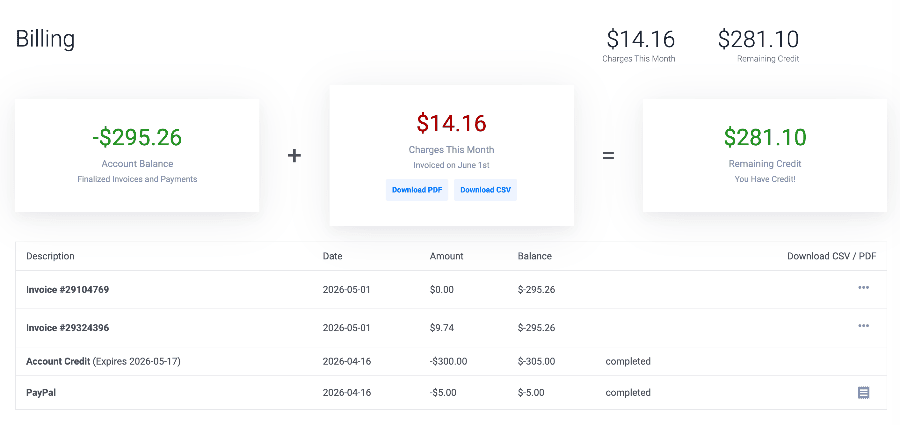
Why Did My Dashboard Show $305 Remaining Credit?
One thing I noticed is that, right after I went ahead and applied the promo code, my billing dashboard showed $305 in balance (and I was expecting just the Vultr $300 credit). This extra $5 that appeared in my account is because of a separate Vultr bonus – one that appears once you connect a valid payment method for the first time. You can look at it as a small verification award from Vultr.
Promo Expiry Terms: What the Screenshots Show
Once you apply this promo code, you will see its expiration date. As aforementioned, this code is designed to be valid for 30 days upon activation, which is exactly what my billing dashboard showed. The expiration date is clearly stated next to the code (and next to all other codes you have entered, if you have multiple ones). All codes are valid from the activation date, not from the sign-up date.
Promo Credit Expiry: What I Saw in My Account
The promo code in my account showed 30 days expiration date from the date I entered the code (activated it). This means that I have only a limited amount of time to spend the credit. If you don’t have a plan beforehand, you may end up spending time on nothing. My recommendation is to have a clear testing plan before you apply the code – check the offers and decide on what you will spend it on, before you click and activate it.
Of course, this was relevant for FLY300VULTR, since this code is very time-sensitive. For other codes, you may be more relaxed (like for VULTRMATCH), since they may offer more time to use them without any urgency.
Things to Check Before You Sign Up
Before you go ahead and apply any Vultr promo code, there are a few things to check and have in mind:
- New accounts only – promotional codes are only for first-time users. If you already have an account, you will not be eligible for this code (you can try to enter it, but it will not apply).
- Valid payment method – you need to enter a valid payment method in order to be able to use the promo credit, and bear in mind that virtual and prepaid cards are not accepted.
- Deposit strategically – depending on the code you want to apply, you need to make sure to maximize its use by depositing strategically (don’t make very small deposits if you want to use VULTRMATCH, for example, since you will not use the code’s full potential).
- Check the coupon page – to ensure you are using only active codes, check Vultr’s official page for confirmation (other third-party coupon websites may have outdated information).
- Understand the coupon – promotional codes are different, and may apply to different products. This is why it’s crucial to understand the code mechanics, as well as the product specification, so you can make the best match.
Final Verdict on Vultr Promo Code
Both codes are legitimate and work, but they serve different needs, which is why it’s important to understand how they work and what you can use them for. The first code, FLY300VULTR, gives you $300 in credit, but you can use it in the first 30 days from activation, which means you need to have a plan for what you will spend it on. The second code, VULTRMATCH, is better for long-term use, since it has a 12-month expiration date.
Overall, the activation of both codes is very easy, intuitive, straightforward, and done in a few minutes. There are no unnecessary steps, no baits – everything is transparent, and all the information is clearly stated.
FAQ
01 Does Vultr Promo Code really work?
Yes, both promo codes (FLY300VULTR and VULTRMATCH) are active and legit codes that work. They have also been verified by multiple users. However, in order to be able to use the code, you must be a new user.
02 Is FLY300VULTR really $300 free credit?
Yes, with the FLY300VULTR promo code, you will receive a $300 credit in your billing dashboard that is valid for 30 days upon activation.
03 What is the difference between FLY300VULTR and VULTRMATCH?
FLY300VULTR promo code gives you $300 in credit you can use in the next 30 days from the activation date, while VULTRMATCH gives you $1 for every $1 you deposit (up to $100), and you can use that credit in the next year from the activation date.
04 Why did the dashboard show $305 remaining credit?
The $5 additional bonus comes from payment method verification (each user gets this stimulative small bonus the first time they enter a valid payment method).
05 Does Vultr promo credit expire?
Yes, Vultr promo codes have expiration dates. The FLY300VULTR is valid for 30 days, while VULTRMATCH is valid for 12 months.
Excerpt:
Vultr’s promo code system requires understanding the expiration window, deposit rules, bonus credit, and code restrictions in order for a user to be able to use the credit properly to the fullest. Here, I have tested two of the most popular Vultr promo codes: FLY300VULTR and VULTRMATCH, and summarized their key differences.
Loading comments....